

Sign in to Hivenet
Access your files and manage your storage account.
Store
Access your files and manage your storage account.
Compute
Launch instances and manage your compute resources.
Store and Compute still use separate accounts today. We’re working on a unified sign-in.
Just need to send a file?
Use Send directlyNew to Hivenet? Get Started
Get started with Hivenet
Choose what you want to use first.
Store
Back up photos and files across your devices.
Compute
Launch self-serve GPU compute for demanding work.
Store and Compute still use separate accounts today. We’re working on a unified account experience.
Need Hivenet for business?
Talk to salesNeed to send a file?
Open SendAlready have an account? Sign in
How to check if fonts are embedded in a PDF before sending it to print
Open the final PDF in Acrobat, choose Document properties, then open Fonts. Look for “Embedded” or “Embedded Subset” next to each font name. If the printer accepts subsets, either label meets the embedding requirement. If a font has neither label, flag the file before sending it.
For our weekly print packet, both the order report and a supplier’s opening-hours insert looked readable on screen. Only the report contained its font. Here’s how to make that decision for a real delivery and tell the contributor exactly what to fix.
Read the font list in the final export
In Acrobat on Windows, find Document properties under Menu. On macOS, use File. Check the PDF you intend to send, even if its editable source uses the right typeface. The printer receives the export.
- Embedded. The file carries the font program. Continue to the next font in the list.
- Embedded Subset. The file carries the characters used in this export. A report that uses just a few names and numbers can have a perfectly usable subset. Ask the printer if it requires full fonts or plans to edit the text.
- A font name with no embedding label. The file refers to the font without carrying it. Your viewer may substitute a local font. Even a familiar name such as Helvetica needs checking if the printer requires every font to be embedded.
An empty list deserves a look at the page itself. Scanned text can be an image, and letters converted to outlines are shapes. Record what you found and check whether the printer accepts that artwork. Adobe’s PDF font guidance explains how embedding and substitution affect the exported file.
Make the call on two sample PDFs
Download the two sample PDFs and their font release sheet. For this packet, the printer accepts embedded subsets and requires every font used as text to be embedded.
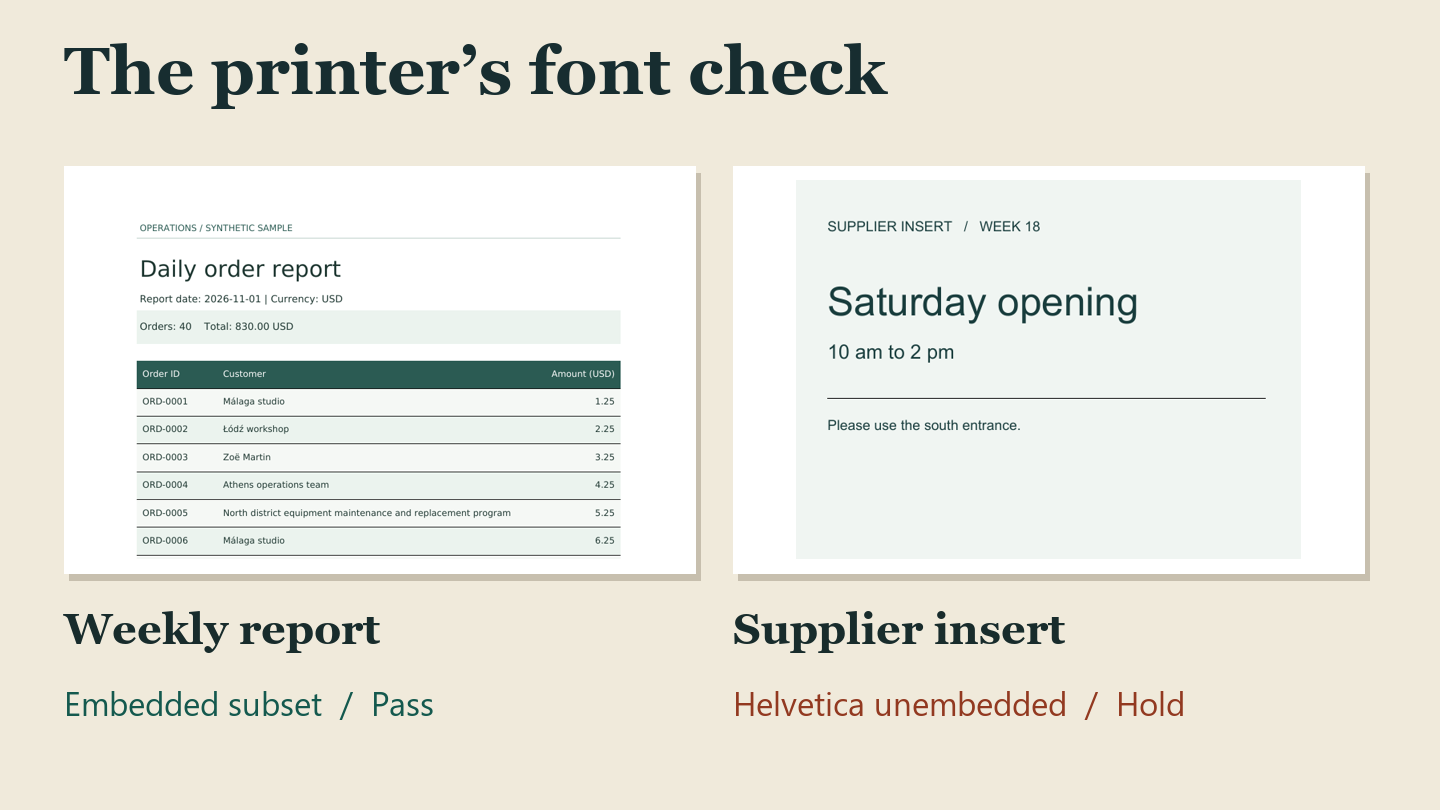
Pass the font check for weekly-report.pdf. Both pages use an embedded TrueType subset of DejaVu Sans Book. A font tool may show it as MPDFAA+DejaVuSansBook. The prefix belongs to this export. The report can move to page proofing. If the report includes photos, check their resolution at the size they’ll print.
Hold supplier-insert.pdf. “Saturday opening” and “10 am to 2 pm” appeared in the rendered proof, but the one-page PDF refers to Helvetica without embedding it. The release sheet gives the contributor a concrete request: “Please re-export the insert with Helvetica embedded, or use an approved font that permits embedding. Send the replacement PDF so we can check it before print.”
On receipt, open the replacement and check its font list again. If the contributor changed the typeface, compare the two PDF proofs to check the opening hours, line breaks and entrance instruction against the approved copy. Keep the held version out of the printer’s delivery folder.
Check a folder with pdffonts
For a weekly packet, Poppler’s pdffonts can list the fonts in each PDF. With Poppler installed, run the following from the folder containing the two sample files. The filenames are quoted so you can use the same form for names containing spaces.
pdffonts "weekly-report.pdf"
pdffonts "supplier-insert.pdf"
Read the emb and sub columns separately. emb yes means the font is embedded. sub yes means it is a subset. A full embedded font can read yes under emb and no under sub. One emb no is enough to hold a file under this printer’s rule. See the pdffonts column reference.
Use one release-sheet row per file and font. Record the filename, font name, embedded and subset flags, decision, and next action. Give unreadable files and empty font lists their own review status. An editor should be able to tell which file to return without reopening the whole packet.
Leave time for corrections before the print cutoff
A workstation is enough for an occasional packet. If several desks share a weekly deadline, record the file count, page count, time spent inspecting files and time spent resolving exceptions. If the automated check itself holds up delivery, use those measurements with the CPU VM buying guide to decide whether a shared worker is worthwhile. A faster worker won’t get a corrected insert back from the supplier sooner.
We inspected the font resources in both sample PDFs and rendered their first pages locally. The release sheet records only the font decision. Page layout, bleed, color and any PDF/X requirement still belong to the printer’s proofing process.
Your next workload belongs on Hivenet.
Pick one AI, compute, or storage workload and see the difference for yourself. Spin it up in minutes, or let our team map your fastest path to production.

