

Sign in to Hivenet
Access your files and manage your storage account.
Store
Access your files and manage your storage account.
Compute
Launch instances and manage your compute resources.
Store and Compute still use separate accounts today. We’re working on a unified sign-in.
Just need to send a file?
Use Send directlyNew to Hivenet? Get Started
Get started with Hivenet
Choose what you want to use first.
Store
Back up photos and files across your devices.
Compute
Launch self-serve GPU compute for demanding work.
Store and Compute still use separate accounts today. We’re working on a unified account experience.
Need Hivenet for business?
Talk to salesNeed to send a file?
Open SendAlready have an account? Sign in
Remove GPS data from a batch of photos and keep the credits
Three JPEGs arrive for the Friday newsletter. The picture desk can publish the photographer’s credit, but the camera coordinates should stay out of the download. Stripping every metadata field would also remove the credit line the desk promised to use. Start with separate delivery copies and decide which files can leave the desk.
Agree on the credit before processing the folder
In this example, the delivery notes call for the credit line Example Studio / Newsletter. The creator is Example Studio and the rights notice is Copyright Example Studio. Those fields answer different questions. A creator name tells you who made the image. The credit line gives you the wording to publish.
Check the supplied originals against the delivery notes. For these files, the agreed line is in IPTC:Credit, with creator and rights in XMP-dc:Creator and XMP-dc:Rights. Other suppliers may use different fields. Record which ones matter for your delivery. If the required credit is missing or the records disagree, hold that file until the picture desk confirms the wording. IPTC photo metadata field definitions
Remove location fields from JPEG copies
Download the three synthetic JPEGs, their reviewed copies and the release report. The example originals contain invented location tags. Unzip the package and open a terminal in the folder containing originals. With ExifTool installed, run this command as one line. Use a fresh output folder for each delivery.
exiftool -o delivery-check/ -ext jpg -GPS:all= "-XMP-exif:GPS*=" -XMP-photoshop:City= -XMP-iptcCore:Location= originalsThe first two removal rules cover the EXIF GPS group and GPS fields in the XMP-exif group. The last two remove the example’s city and location labels. The command writes the JPEG copies into delivery-check. It leaves the source images in originals. The example covers top-level files with the .jpg extension.
Reopen the copies before signing off
Read the written files from the output folder. This command lists the fields used in the example, including the credit and orientation. Run it locally. If an unexpected location value appears, keep it out of the shared release report and hold the file for review.
exiftool -G1 -a -s -GPS:all "-XMP-exif:GPS*" -XMP-photoshop:City -XMP-iptcCore:Location -IPTC:Credit -XMP-dc:Creator -XMP-dc:Rights -IFD0:Orientation -ext jpg delivery-checkFor each JPEG, confirm that the specified location fields are absent and that the credit, creator and rights agree with the delivery notes. Open each image in a viewer that honors orientation. A portrait stored sideways can depend on its orientation tag to display upright.
Read the release report
In the local run with ExifTool 13.50, all three originals contained EXIF GPS coordinates, duplicate XMP coordinates and both place labels. After processing, none of those fields appeared in the reviewed copies. We reopened all three images and compared their displayed pixels with the originals. The originals also matched their before-run checksums.
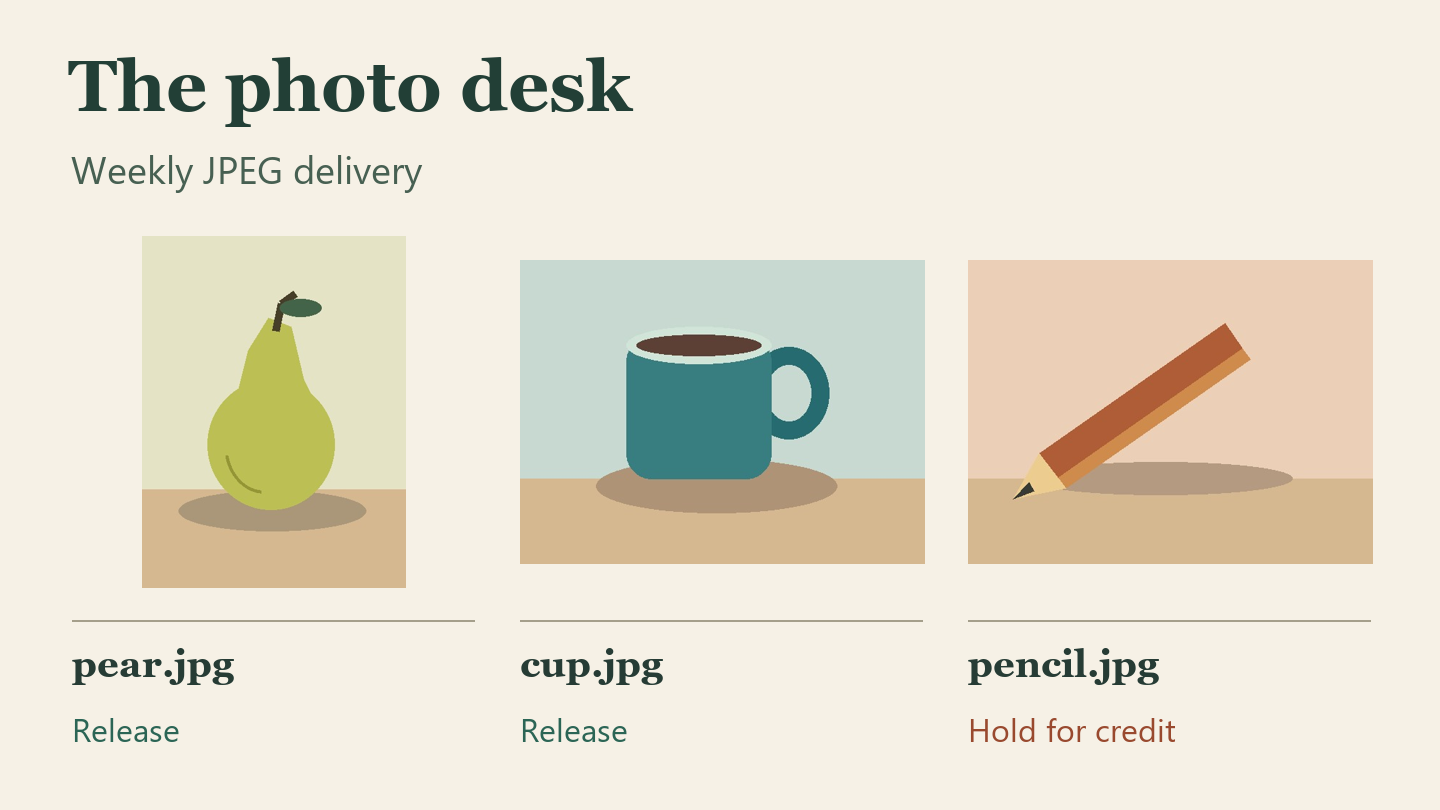
- Release pear.jpg. The credit line matched. The pear remained upright at 420 by 560 pixels with its orientation tag intact.
- Release cup.jpg. The credit line matched and the cup retained its landscape orientation.
- Hold pencil.jpg for credit. The location check passed, but the supplied JPEG had no credit line. Creator and rights survived. Consult the delivery notes or ask the picture desk for the approved credit before uploading this one.
Use the decisions in review-report.csv to select the release files. The output folder contains all three processed images, including the held pencil. Keep the originals out of the publication upload.
This check covers the named metadata fields in these JPEGs. Other metadata, captions, filenames or recognizable landmarks may still reveal a location. If the CMS generates another downloadable version, reopen that version and check the credit, location fields and orientation again. The local run did not test a CMS rendition or a cloud worker.
Choose where the weekly delivery runs
For one editor and a small folder, use the workstation already holding the photos. If several desks share an unattended queue and deliveries start missing their cutoff, record the file count, total bytes, processing time and transfer time for a typical batch. If copying the JPEGs takes most of the time, consider where the files and worker sit. Use those measurements to compare CPU VM options for the weekly photo delivery.
Your next workload belongs on Hivenet.
Pick one AI, compute, or storage workload and see the difference for yourself. Spin it up in minutes, or let our team map your fastest path to production.

