Sign in to Hivenet
Access your files and manage your storage account.
Store
Access your files and manage your storage account.
Compute
Launch instances and manage your compute resources.
Store and Compute still use separate accounts today. We’re working on a unified sign-in.
Just need to send a file?
Use Send directlyNew to Hivenet? Get Started
Get started with Hivenet
Choose what you want to use first.
Store
Back up photos and files across your devices.
Compute
Launch self-serve GPU compute for demanding work.
Store and Compute still use separate accounts today. We’re working on a unified account experience.
Need Hivenet for business?
Talk to salesNeed to send a file?
Open SendAlready have an account? Sign in
Batch resize images with Python and Pillow
A folder of product or content images usually arrives with mixed dimensions, orientations, and backgrounds. A small Python batch can turn those files into bounded thumbnails while keeping the originals intact. The useful result is a set of readable images and a record of which files succeeded, not just a script that reaches the end.
This guide uses Pillow to process local JPEG and PNG files sequentially. It writes PNG thumbnails to a new directory, preserves aspect ratio and transparency, applies EXIF orientation, and records per-file results in a JSON manifest. Start with the synthetic fixtures before trying a copy of your own images.
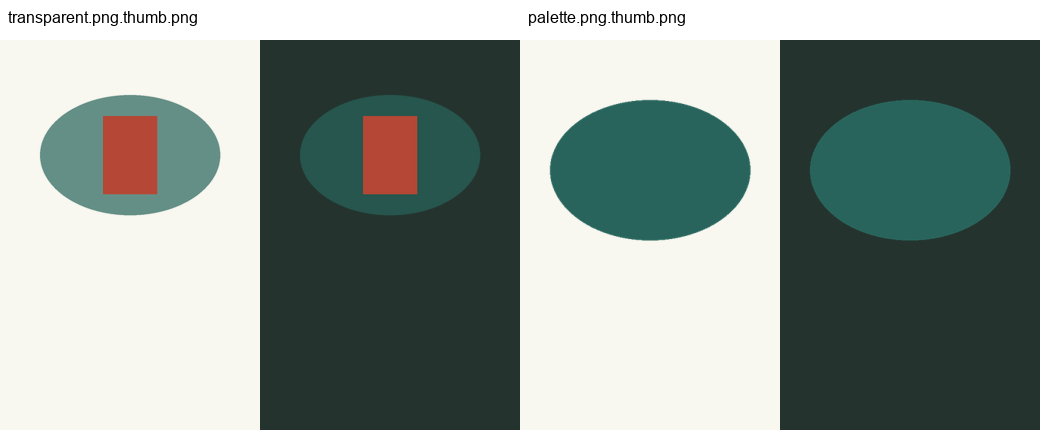
Validation status, November 11, 2026: 25 local tests passed on Windows with Python 3.12.14 and Pillow 13.0.0. The sample produced eight thumbnails with no failures. We inspected all eight in a comparison sheet and checked both transparent outputs against light and dark backgrounds. Linux/macOS, containers, Celery workers, scheduling, concurrent writers, crash recovery, and Hivenet deployment remain untested.
Download the batch resizing example
Download the Python image-resizing project. It contains the complete script, tests, fixture generator, eight synthetic source images, example outputs, and inspection sheets. The article shows excerpts from that project; use the complete files for the commands.
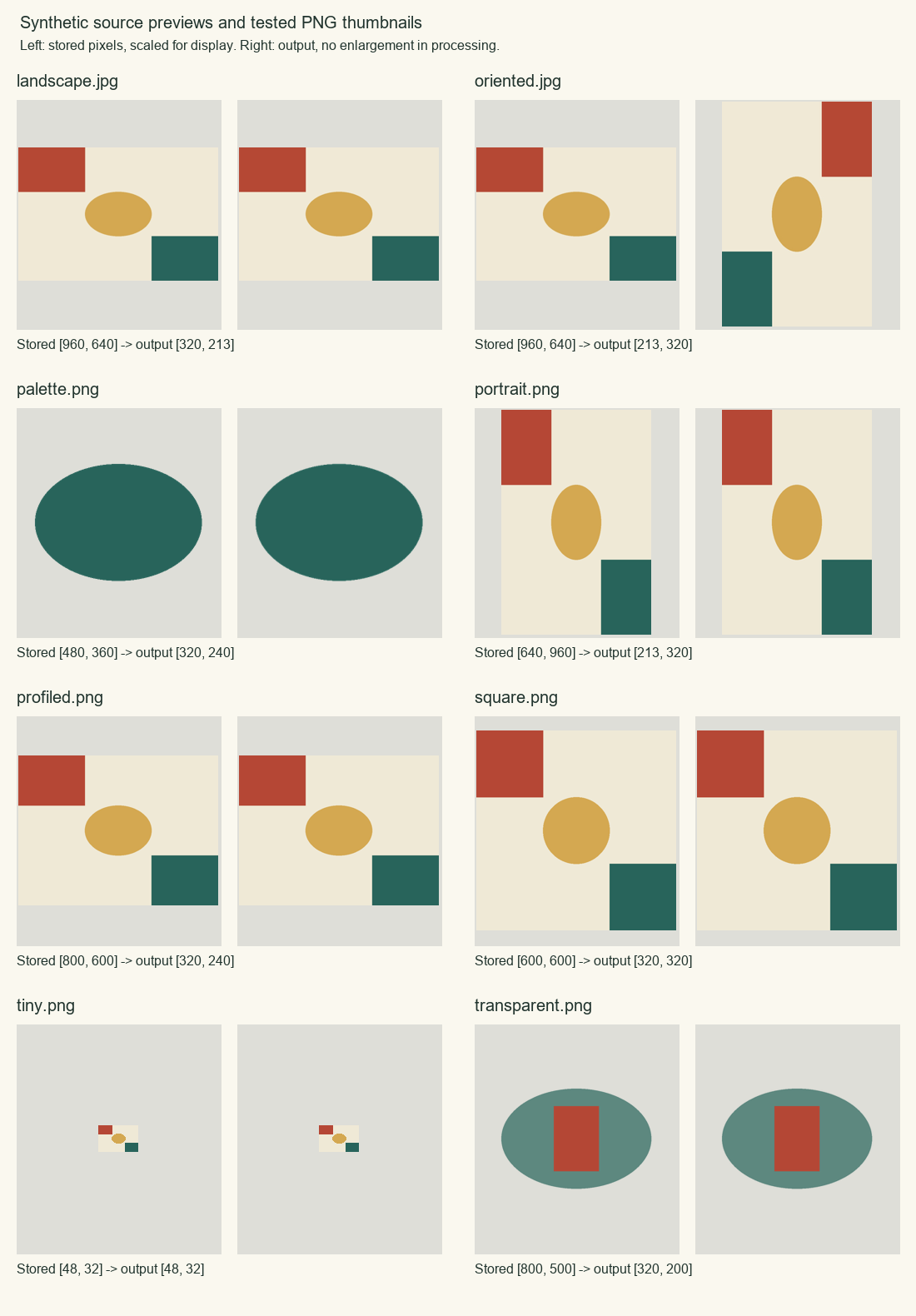
The default bounding box is 320 by 320 pixels. A landscape image becomes 320 by 213; a portrait becomes 213 by 320. A 48-by-32 input stays that size. The box is a maximum, not a request to stretch every image into a square.
Install Pillow and run the supplied fixtures
Pillow is the maintained Python Imaging Library fork; its Python imports use the PIL namespace. This sample pins Pillow 13.0.0, the released version used for the checks. Open a terminal in the extracted project directory and create an isolated environment:
python -m venv .venv
.venv\Scripts\python.exe -m pip install -r requirements.txt
.venv\Scripts\python.exe -m unittest -v
.venv\Scripts\python.exe resize_batch.py fixtures thumbnails --width 320 --height 320
These are the tested Windows command forms. On Linux or macOS the environment interpreter is .venv/bin/python, but those systems and their permission behavior were not exercised here. The archive already contains the fixtures; there is no need to regenerate them.
The output directory must not exist. For another run, choose a new name such as thumbnails-02. The observed fixture summary was:
{"input_files": 8, "succeeded": 8, "failed": 0}Open thumbnails/manifest.json and the generated PNG files. Each output name retains the complete input filename, such as landscape.jpg.thumb.png. That keeps landscape.jpg and landscape.png distinct instead of overwriting one with the other.
Resize an image without changing its aspect ratio
The central operation uses thumbnail() on the decoded image object. Pillow calculates a size that fits within the requested width and height while preserving the image's proportions. The method changes that object in place, so the program writes the result elsewhere instead of saving over the original image file. See the thumbnail reference.
This excerpt appears inside render_thumbnail(), after the source has passed the file and pixel checks. Here, bounds is the two-integer box supplied to the batch:
image = ImageOps.exif_transpose(source)
oriented_size = image.size
has_alpha = "A" in image.getbands() or "transparency" in image.info
image = image.convert("RGBA" if has_alpha else "RGB")
The complete function checks profile compatibility before continuing with:
image.thumbnail(bounds, Image.Resampling.LANCZOS)
image.info.clear()
buffer = io.BytesIO()
image.save(buffer, format="PNG", icc_profile=profile)
LANCZOS is the resampling filter selected for this example. It is a choice to inspect against your images, not a claim of the fastest or universally best filter. Integer pixel dimensions can introduce a small rounding difference in the ratio.
For a fixed-size card, decide whether the design permits cropping or needs padding. Pillow also provides fit() and pad() in its image operations reference. This sample uses neither: it preserves the full image inside the box and leaves smaller images alone.
Handle orientation, transparency, and metadata explicitly
A camera file may store landscape pixels plus an EXIF instruction telling a viewer to rotate them. Apply that orientation before choosing the thumbnail dimensions. The fixture with orientation 6 starts as 960 by 640 stored pixels and becomes a 213-by-320 portrait thumbnail. The test checks both its dimensions and the position of a colored corner marker.
PNG inputs with an alpha channel, including palette transparency, are converted to RGBA and stay transparent in the output. Opaque inputs become RGB. Inspect transparent edges against different backgrounds; a white preview can hide a problem that appears on a dark page.
The script omits EXIF, XMP, and text metadata after applying orientation. It copies embedded RGB ICC profile bytes without converting or validating the color profile. Profiled non-RGB inputs are rejected rather than attaching a grayscale profile to converted RGB pixels. This is not a complete color-management or metadata-sanitization service; test real profiles and privacy requirements before adapting it.
All outputs use PNG, including JPEG inputs. This keeps one output policy and preserves alpha, but fewer pixels do not guarantee fewer bytes: a PNG can be larger than the original JPEG. If delivery size matters, choose the format and compression policy separately and inspect the result. Pillow's format documentation describes the available options.
Bound the batch and make failed files visible
The script accepts 1 to 200 top-level files, with a 20 MiB encoded-byte limit per file and a 20-million-pixel decoded-image limit. Width and height arguments must each be integers from 1 to 4096. These are teaching limits, not measured safe capacity for a server. Decoding, orientation, and conversion can hold several copies of an image in memory.
Subdirectories are ignored. Symlink inputs are rejected, although symlink and filesystem-race behavior were not tested on this host. Unsupported formats, animated PNGs, unsupported color modes, corrupt files, and oversized inputs become failed manifest entries. The process continues with the other files.
The decoder reads the image fully before publishing a thumbnail. Pillow's decompression-bomb warnings are treated as errors, and its protection is not disabled. See its image-opening and pixel-limit guidance. This local program assumes an operator-controlled folder; these checks do not turn it into a safe public-upload endpoint.
Each manifest entry identifies the source filename, result, output filename when successful, source hash, and input and output dimensions. Errors include a type and a bounded message. Keep the manifest local if source names are sensitive.
A completed batch exits with 0 when all files succeed or 2 when the manifest contains per-file failures. Batch setup or manifest-write failures return 1; invalid command-line syntax follows argparse's error behavior. Check both the exit status and manifest before treating a run as complete.
Choose clear behavior for reruns and partial output
The program refuses an existing output directory and an output path inside the input directory. Every run gets a fresh destination. The tests confirm that originals retain their hashes and that a second fresh run produces matching decoded output pixels. This does not claim byte-identical output across package versions.
Each completed thumbnail is written through a temporary file in the destination directory, then moved into its final name with os.replace(). The simulated replacement-failure test verifies cleanup and preservation of a preexisting test file. That test is narrower than a process kill, full disk, power loss, or failed storage device.
The entire batch is not one transaction. If the final manifest cannot be written, completed thumbnails can remain without a manifest, and the command returns 1. Inspect that directory and use a new destination for a retry. The sample has no shared job ledger, concurrent-writer coordination, or recovery service.
Test dimensions and inspect the output images
The 25 tests cover landscape, portrait, square, small, rotated, transparent, palette, and profiled fixtures; malformed, truncated, unsupported, and animated inputs; byte, pixel, and file-count limits; output naming; original preservation; fresh reruns; and simulated file and manifest write failures. Pixel-limit tests lower the threshold on small fixtures instead of attempting memory exhaustion.
The eight-image run produced 320-by-213, 213-by-320, 320-by-240, 320-by-320, 48-by-32, and 320-by-200 outputs according to the source shape. We reopened each output and checked it against the manifest. Visual inspection confirmed retained shapes, the corrected orientation marker, unchanged tiny-image size, and transparent edges on light and dark backgrounds.
For your own sample, inspect a range of sizes and content, especially small text, fine edges, camera orientation, and transparency. Compare output dimensions with the bounding box, then check that the last file and every rejected file appear in the manifest. Passing these synthetic checks does not establish color fidelity for every camera, acceptable quality for every product image, or production throughput.
Decide when the batch belongs on a CPU worker
A local script is enough for occasional image preparation. A recurring job may justify a CPU VM when you need a stable environment, control over dependencies, and access to the input and output storage. Use the CPU VM buying guide to compare that operating work with a managed service.
If requests arrive independently or work needs a separate lifetime, the Celery with Redis guide supplies a worker example. This resizing script is not connected to it. A real adapter must define authorized storage references, job state, result access, failure reconciliation, and what a repeated job may overwrite. Sending a task ID does not prove the thumbnails are available.
Start with sequential processing and representative inputs before choosing parallelism. The worker concurrency guide explains how memory per process and queue delay affect that decision. No timing, CPU-capacity, or memory benchmark is claimed for this sample.
Hivenet's vCPU documentation lists non-GPU data-processing scripts and background services as possible workloads. That supports evaluating this job on CPU compute; it does not establish available capacity, a managed image-processing service, or a tested deployment. Queue execution, scheduling, storage integration, retries after interruption, and cloud behavior remain separate checks.
Your next workload belongs on Hivenet.
Pick one AI, compute, or storage workload and see the difference for yourself. Spin it up in minutes, or let our team map your fastest path to production.