

Sign in to Hivenet
Access your files and manage your storage account.
Store
Access your files and manage your storage account.
Compute
Launch instances and manage your compute resources.
Store and Compute still use separate accounts today. We’re working on a unified sign-in.
Just need to send a file?
Use Send directlyNew to Hivenet? Get Started
Get started with Hivenet
Choose what you want to use first.
Store
Back up photos and files across your devices.
Compute
Launch self-serve GPU compute for demanding work.
Store and Compute still use separate accounts today. We’re working on a unified account experience.
Need Hivenet for business?
Talk to salesNeed to send a file?
Open SendAlready have an account? Sign in
Check a documentation build for broken internal links with Python
The docs build passes on Friday, but “Set up the client” still points to a page you moved on Tuesday. A second link opens the right guide and leaves the reader at the top because you renamed the heading. A Python broken link checker can catch both mistakes in the built HTML before the release goes out.
Start with the folder your team plans to publish. The output is a CSV with one row per link: the source page, the words the reader clicks, the destination and the finding. Those first two columns tell an editor where to make the repair.
Run the checker on a release folder
Download the Python checker, two example builds and their CSV reports. Unzip the files into one folder and open a terminal there. The script uses Python 3’s standard library and reads local HTML files. It makes no network requests.
python check_docs.py build > before.csvOpen before.csv in a spreadsheet or text editor. The terminal summary for the included build reads 2 pages, 4 links, 2 repairs. The command exits with status 1 when it finds links to repair, so a build runner can flag the result while keeping the report.
Read the two repair rows
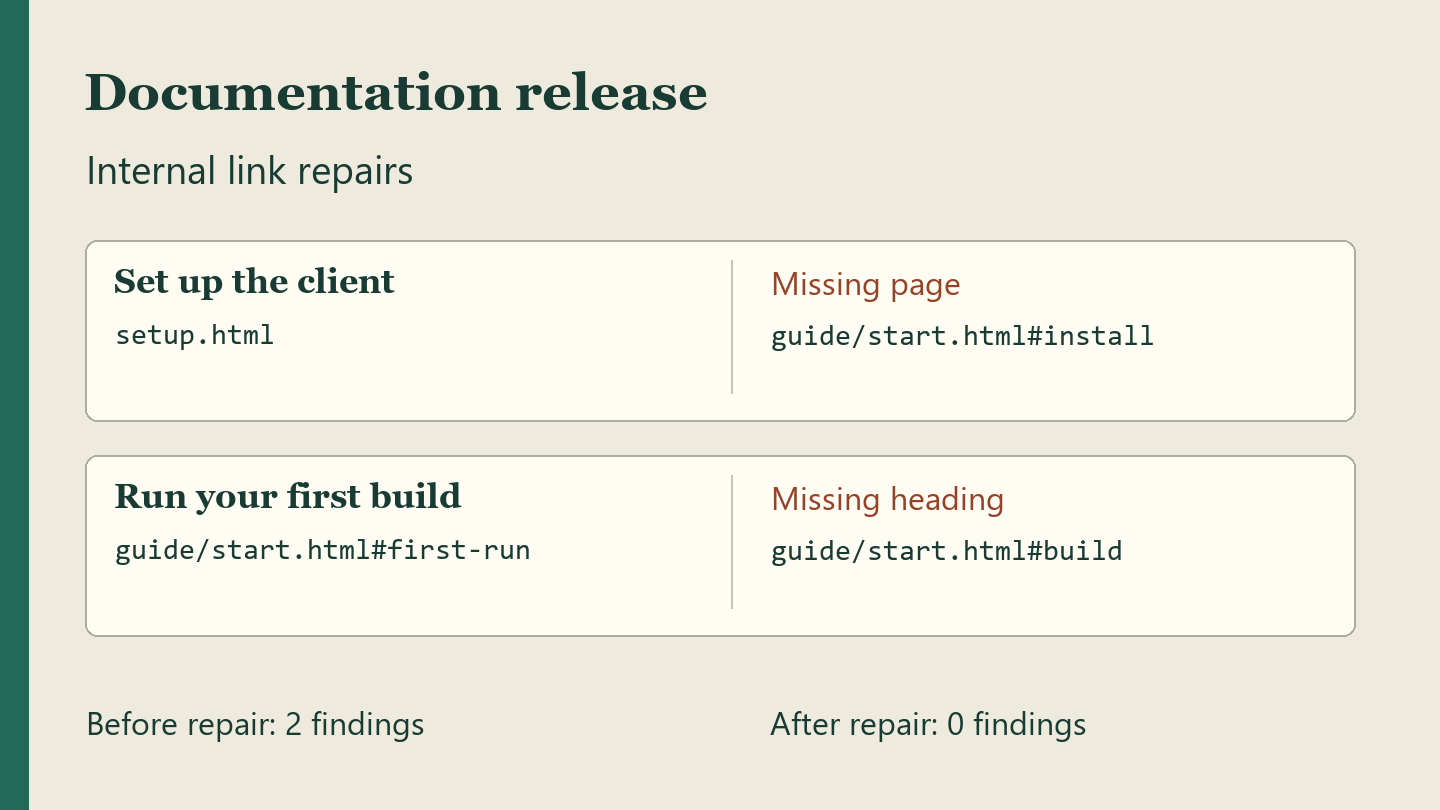
Both findings come from index.html, the weekly release page. Find these link labels in the source document that produces it.
- “Set up the client” points to a missing page. Its destination is
setup.html. The setup instructions now live under “Set up the client” inguide/start.html. Point the link toguide/start.html#installso the reader lands on the instructions. - “Run your first build” points to a missing heading. The file
guide/start.htmlexists. The old link still ends in#first-run, while the heading in the new build hasid="build". Change the destination toguide/start.html#build.
The other two rows explain the boundaries of the report. “Start here” points to an existing guide and passes. “Service status” points to an external site and is marked skipped. Its availability is unknown from this check.
Rebuild and follow the repaired links
Make the changes in the Markdown, template or other source that owns the links. An edit made only to the generated HTML disappears at the next build. To see the expected result with the download, run the checker against the included corrected folder.
python check_docs.py fixed > after.csvThe corrected run returned 2 pages, 4 links, 0 repairs and exit status 0. Three internal links passed. The external status link was still skipped. Before signing off on your own release, follow the two repaired links in the preview and read the heading each one reaches. An existing ID can still lead to the wrong instructions.
Will last week’s bookmarks still work?
Imagine a reader bookmarked /setup.html before you moved the setup instructions. The corrected build can report zero repairs because none of its pages link to that old address anymore. The reader’s bookmark still points there.
Compare the page paths from the last published release with those in the proposed release. Use complete lists for the same docs version, language and base path. If you have CSV exports, compare the two snapshots by a shared key, using the page path as the key. Review paths that appear only in the older list. If a path is missing from a sitemap, check the page itself before calling it retired.
For /setup.html, read the proposed replacement at /guide/start.html#install. Can someone still set up the client from that section? If so, give the old and new addresses to the person who manages redirects. If the instructions were deliberately removed and have no replacement, record that decision. After release, open the old bookmarked URL and confirm it takes you to the intended instructions. The local example tests links inside the build only.
Match the checker to the site’s URL rules
The script reads each UTF-8 .html file once. It collects element IDs, link destinations and link text using Python’s HTML parser. For a link such as guide/start.html#build, it resolves the page relative to the source, finds it in the build, then looks up the ID on that page. MDN explains how a URL fragment identifies a section of a document.
The example treats the build folder as the site root, a trailing slash as index.html, and a fragment on its own as a link within the current page. It checks relative and root-relative HTML links. Absolute URLs, including full URLs on your own domain, are skipped. It also skips extensionless routes without a trailing slash and non-HTML files. Review skipped rows before treating the report as complete for your site.
The local example covers a moved page and an ordinary HTML heading ID. Sites mounted below a path, custom rewrites, <base> elements, and headings inserted by JavaScript need their own rules or a separate preview check. Production redirects, scheduled runs and cloud performance were outside the local check.
Choose where the recurring check runs
For one small docs site, run the check after your existing build and keep the CSV with the release. A separate machine becomes worth comparing if versioned or translated builds queue behind one another and hold up the editor’s review. Record the page count, elapsed time and peak memory for a representative release. Separate time spent waiting for a runner from time spent reading and checking files. Use those figures to compare CPU VM options for the release job.
Your next workload belongs on Hivenet.
Pick one AI, compute, or storage workload and see the difference for yourself. Spin it up in minutes, or let our team map your fastest path to production.

