

Sign in to Hivenet
Access your files and manage your storage account.
Store
Access your files and manage your storage account.
Compute
Launch instances and manage your compute resources.
Store and Compute still use separate accounts today. We’re working on a unified sign-in.
Just need to send a file?
Use Send directlyNew to Hivenet? Get Started
Get started with Hivenet
Choose what you want to use first.
Store
Back up photos and files across your devices.
Compute
Launch self-serve GPU compute for demanding work.
Store and Compute still use separate accounts today. We’re working on a unified account experience.
Need Hivenet for business?
Talk to salesNeed to send a file?
Open SendAlready have an account? Sign in

What does an HPC architect do? A guide to system design
An HPC architect designs computing environments for demanding scientific, engineering, and data-processing workloads. The role turns application requirements into choices about processors, memory, networking, storage, scheduling, and software, then tests whether those choices deliver useful results within the project's time and cost limits.
For researchers, engineers, and teams planning infrastructure, this guide explains how high-performance computing architecture is designed. It covers the decisions behind a single powerful machine, a cluster, or a cloud deployment, with a reference diagram and a practical design checklist.
What does an HPC architect do?
The architect connects the people running applications with the people providing infrastructure. Typical outputs include a workload profile, an architecture diagram, a resource-sizing proposal, a benchmark plan, and documented decisions about security, operations, and cost. The design should explain what the system needs to accomplish and how the team will know it works.
That responsibility extends beyond selecting servers. A fast processor can spend much of its time waiting for memory, another process, or a shared disk. An application may also depend on a particular compiler, accelerator runtime, or software license. These constraints belong in the design before hardware is ordered or instances are launched.
The HPC architect usually leads requirements and design decisions. An HPC engineer or administrator more often implements, operates, and troubleshoots the environment. Responsibilities overlap, especially in smaller teams, and operational feedback should shape the architecture.
Start with the workload and the required result
Begin with a representative application and a measurable target: complete one validated simulation before a deadline, process a daily batch, or support several research groups with acceptable queue times. Record the current runtime and the steps needed to produce a usable result.
Compute: which stages use CPUs or GPUs, and does the application support multiple devices or nodes?
Memory: what is the peak working set, and how much must fit in each node or GPU?
Communication: how often do parallel tasks exchange data or wait for one another?
Data: what are the input size, read/write pattern, checkpoint frequency, and retention needs?
Operations: what are the deadlines, expected concurrency, software licenses, access rules, and recovery requirements?
Profile the whole workflow. A solver can be tightly coupled while its preprocessing and independent parameter studies are not. Microsoft's HPC design methodology treats these communication patterns as an early design decision because they affect compute, networking, and placement.
Tightly coupled and independent workloads need different designs
In a tightly coupled job, processes exchange data frequently while solving one problem. A distributed fluid-dynamics solver may need results from neighboring parts of a mesh before it can advance. As the job spans more nodes, network delays and synchronization can limit the benefit of additional processors.
Loosely coupled work consists of tasks that run mostly independently, such as separate rendering frames or a parameter sweep. The design can emphasize completed jobs per hour, reliable dispatch, and efficient staging of inputs. Independent tasks can still overload shared storage or exhaust software licenses when launched together.
For multi-node work, evaluate latency, usable bandwidth, communication libraries, and node placement. AWS's HPC networking guidance also notes that some tightly coupled applications can fit inside one large instance, avoiding inter-node communication. InfiniBand, RoCE, and other specialized fabrics are options to evaluate against the workload, not requirements for every HPC system.
Choose compute and memory together
CPU selection depends on application behavior: per-core performance, core count, vector instructions, memory capacity, and memory bandwidth can all matter. More cores offer little benefit when the program cannot use them or when they compete for a saturated memory subsystem. On multi-socket machines, test process placement and access to local versus remote memory.
A GPU helps when the application has a supported acceleration path. Check the required numerical precision, available GPU memory, supported libraries, and the parts of the workflow that remain on the CPU. A GPU suitable for a low-precision machine-learning workload may be a poor choice for a solver that depends on strong double-precision performance.
For multi-GPU work, examine how the application divides data and communicates between devices. Several GPUs do not automatically behave like one device with a single combined memory pool. A model or solver must support an appropriate distribution strategy.
Lawrence Livermore's parallel-computing tutorial explains the differences between shared and distributed memory, along with communication and synchronization costs. These are reasons to test scaling with the actual application rather than infer it from processor counts.
Plan storage around access patterns and data lifetime
Separate temporary working space from retained inputs and results. Local NVMe can serve scratch files and caches; shared file storage lets several machines access a common namespace. A parallel file system may be justified when the application needs shared file semantics and high aggregate I/O across nodes.
Object storage offers a different interface for datasets, outputs, and archives. Applications may use it directly or stage data to a file system before processing. S3 compatibility alone does not provide POSIX file behavior. Our HPC file-systems guide explains those distinctions and the measurements that help identify an I/O bottleneck.
Map each dataset through arrival, processing, checkpointing, export, and deletion. Specify who owns it and what survives a failed job or terminated instance. Test a restart from a saved checkpoint; a file being present does not prove that recovery works.
Make scheduling and software part of the architecture
A scheduler allocates resources and decides which waiting jobs can run. The Slurm documentation describes resource allocation, job execution and monitoring, and management of queued work as its core functions. Slurm is one option for shared clusters; a smaller instance-based workflow may use a simpler queue or an application's own controls.
Define what a job requests: CPU cores, memory, GPUs, runtime, and any scarce licenses. Decide how priorities and limits work when several teams compete for capacity. Scheduling policy affects waiting time and fairness, even when the underlying hardware performs well.
The software plan should record the operating system, drivers, compilers, MPI implementation, numerical libraries, application version, and license dependencies. Containers and environment modules can help reproduce environments, but compatibility with host drivers and communication hardware still needs testing.
Keep infrastructure definitions and configuration under version control. Google's Cluster Toolkit blueprints provide one example of reusable configurations that describe cluster components and their dependencies. Whatever tooling you choose, test that another team member can recreate the environment from the recorded configuration.
HPC architecture diagram: a reference pattern
The diagram separates job submission from the paths used to read, write, and exchange data. Monitoring, access policy, and cost tracking apply across the system; they are not the final step after storage.
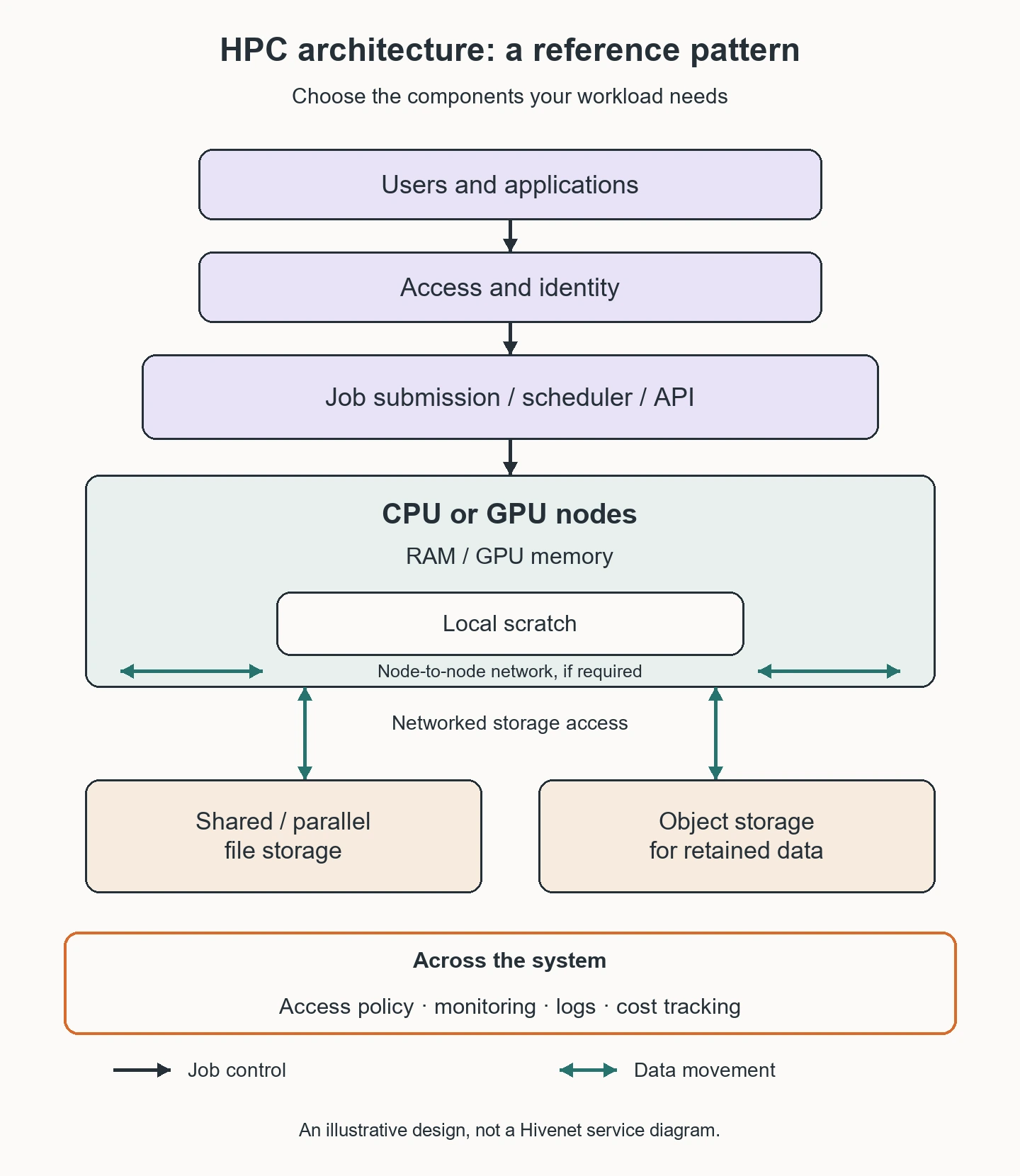
Users authenticate and submit work through an approved interface. A scheduler or job controller assigns resources. Compute nodes use their local scratch space and, when needed, networked file or object storage. Multiple compute nodes exchange data over an interconnect when the application requires it.
This is a reference pattern, not a mandatory topology or a diagram of Hivenet's service. A single-node workflow can omit the inter-node fabric, and an independent batch may not need a parallel file system.
Choose on-premises, cloud, or hybrid deployment
On-premises infrastructure can fit predictable demand, specialized hardware requirements, or datasets that are expensive to move. Include power, cooling, maintenance, capacity planning, and the staff needed to operate the system. High utilization can improve the economics, but it does not establish the lowest total cost by itself.
Cloud HPC can provide temporary capacity or a way to test configurations before a longer commitment. Check availability, quotas, data-transfer time, licensing, and the actual network and storage options. Cloud capacity still needs a workload-specific design.
Hybrid HPC combines environments. It can keep one workload near its data while moving independent jobs elsewhere, but adds requirements for identity, data synchronization, software consistency, and scheduling. Intel's HPC architecture overview describes cloud and hybrid approaches; the right placement still depends on measured workload behavior.
For example, a team might retain a tightly coupled solver on an existing cluster and evaluate cloud instances for independent parameter studies. That is a design option to test, not evidence that every simulation will run efficiently across both environments.
Define security, recovery, and operating responsibilities
Document who can submit jobs, administer nodes, read shared data, and change images or templates. Use separate permissions for users and automation, protect secrets, and restrict exposed management interfaces. A private network does not replace access control or software maintenance.
Assign responsibility for updates, failed jobs, backup retention, and incident response. Determine what happens when a node fails, a license server becomes unavailable, or a storage limit is reached. Recovery requirements should influence checkpoint placement, configuration records, and spare capacity.
Track queue time, valid job completion, utilization, I/O waits, and cost by project. These measures help distinguish a slow application from a congested system and show whether capacity is being used effectively.
What skills does an HPC architect need?
The role combines Linux and system administration knowledge with parallel computing, CPU/GPU hardware, networking, storage, schedulers, and software environments. Performance profiling, automation, security, and cost analysis help turn component knowledge into a workable design.
Requirements discovery and clear documentation matter as much as familiarity with tools. The architect needs to ask a researcher what counts as a valid result, explain trade-offs to a budget owner, and give operations staff a system they can maintain. There is no universal experience threshold or certification that applies to every HPC architect position.
Where Compute with Hivenet can fit
Compute with Hivenet provides CPU and GPU instance options that an architect can evaluate as part of a broader design. Potential uses include supported single-node applications, independent simulation jobs, rendering, and development or testing. The application, selected configuration, and operating requirements determine suitability.
The Compute FAQ documents container and virtual-machine options, SSH access, and NVMe storage. Verify the current configuration and storage lifecycle before using an instance for retained research data. Test a representative job and confirm that its outputs can be recovered.
For tightly coupled multi-node work, confirm networking, MPI compatibility, scheduling, shared storage, and support arrangements with Hivenet. Instance availability alone does not establish a managed HPC cluster, a parallel POSIX file system, or a particular interconnect performance level.
A practical HPC architecture checklist
Define the result, deadline, workload profile, and acceptance criteria.
Measure a representative baseline and identify compute, memory, communication, and I/O limits.
Select feasible components and document software, licensing, access, and data-location constraints.
Test the complete workflow, including data staging, concurrent jobs, failure, and recovery.
Compare end-to-end time and total cost, then record the configuration and the reasons for the decision.
Keep benchmark inputs and validation criteria consistent across configurations. Include queue time, setup, transfers, storage, licenses, failed runs, and operating work in the comparison. A shorter compute run can still produce a slower or more expensive overall workflow.
Frequently asked questions
Does HPC architecture always mean a cluster?
No. A workload can run on one large CPU machine or a GPU-equipped node. Use multiple nodes when the application supports them and the additional capacity or measured speedup justifies the complexity.
Does an HPC architect write application code?
The role may involve scripts, automation, profiling, and collaboration on application changes. Ownership of the scientific code varies by team. The architect must understand how it behaves well enough to choose and validate infrastructure.
Do all HPC systems need GPUs, Slurm, or a parallel file system?
No. Those are design choices. Accelerator support, scheduling requirements, data access, scale, and operating constraints determine which components are useful.
How do you know the architecture is successful?
The system produces valid results within agreed time, cost, security, and recovery requirements under representative load. Peak hardware specifications are supporting information, not the acceptance test.
Your next workload belongs on Hivenet.
Pick one AI, compute, or storage workload and see the difference for yourself. Spin it up in minutes, or let our team map your fastest path to production.

