

Sign in to Hivenet
Access your files and manage your storage account.
Store
Access your files and manage your storage account.
Compute
Launch instances and manage your compute resources.
Store and Compute still use separate accounts today. We’re working on a unified sign-in.
Just need to send a file?
Use Send directlyNew to Hivenet? Get Started
Get started with Hivenet
Choose what you want to use first.
Store
Back up photos and files across your devices.
Compute
Launch self-serve GPU compute for demanding work.
Store and Compute still use separate accounts today. We’re working on a unified account experience.
Need Hivenet for business?
Talk to salesNeed to send a file?
Open SendAlready have an account? Sign in

Website change detection with Python: track meaningful changes with Playwright
You can monitor website changes with Python by collecting a small, validated set of fields and comparing each successful observation with the last valid baseline. Use Playwright, a browser automation library, when those fields appear after JavaScript runs. Store a change event only when the fields you care about differ; a timeout or missing price should leave the baseline intact.
This guide is for Python developers adding change history to a recurring collection job. The example follows one product on an owned local page. It separates collection, comparison, and storage so that a changed timestamp does not become a price alert. It also gives each observation and recorded transition an identity that can be inspected later.
Tested local example. On November 16, 2026, 16 automated tests passed across the 15 test groups described below. The fresh six-observation run produced five valid checks, one intentional extraction error, and two change events. Testing used Windows 11, Python 3.12.14, Playwright 1.65.2, Chromium 159.0.8154.6, and SQLite 3.53.1. These results cover the owned local fixture, not production operation.
Choose a script when the comparison rules matter
A custom script makes sense when you need to decide exactly which fields count as a change, retain before-and-after values, and connect the results to another application. If you mainly want page-change notifications, assess an existing tool first. changedetection.io project, for example, supports filters, browser-based fetching, and notifications. This tutorial does not compare current pricing, deployment effort, or notification reliability.
Use an available API when it provides the fields and access you need. Static content is available in the returned HTML; dynamic content is added or changed by JavaScript. A page that returns the relevant data in its initial HTML may not need a browser. For JavaScript-rendered pages, our Playwright web scraping example covers extraction and output replacement. Here, the additional job is deciding what changed between valid observations.
Define meaningful changes before writing the loop
The comparison policy is deliberately narrow: product P-001 from the owned catalog, a USD price stored in integer cents, and availability equal to either in_stock or out_of_stock. A banner and a generated timestamp are outside that policy. Leading and trailing whitespace is harmless; an unknown currency, duplicate product, or missing price is an error.
Values such as 9.9 and 9.90 represent the same price under this USD-only policy. The parser does not accept currency symbols, commas, negative amounts, or more than two decimal places. That restriction makes ambiguous input fail visibly. Adapting the example to other currencies requires an explicit rule for their minor units and a new policy version.
The state decision
| Observation | Baseline action | Change event |
|---|---|---|
| First valid fields | Create baseline | None |
| Same valid fields | Update successful observation | None |
| Different valid fields | Advance revision | Save before and after |
| Failed check | Preserve last valid baseline | None |
| Different comparison policy | Require explicit rebaseline | None |
The state flow is: fetch → wait for readiness → validate identity and fields → compare → commit. An error before comparison exits that flow and preserves the baseline.
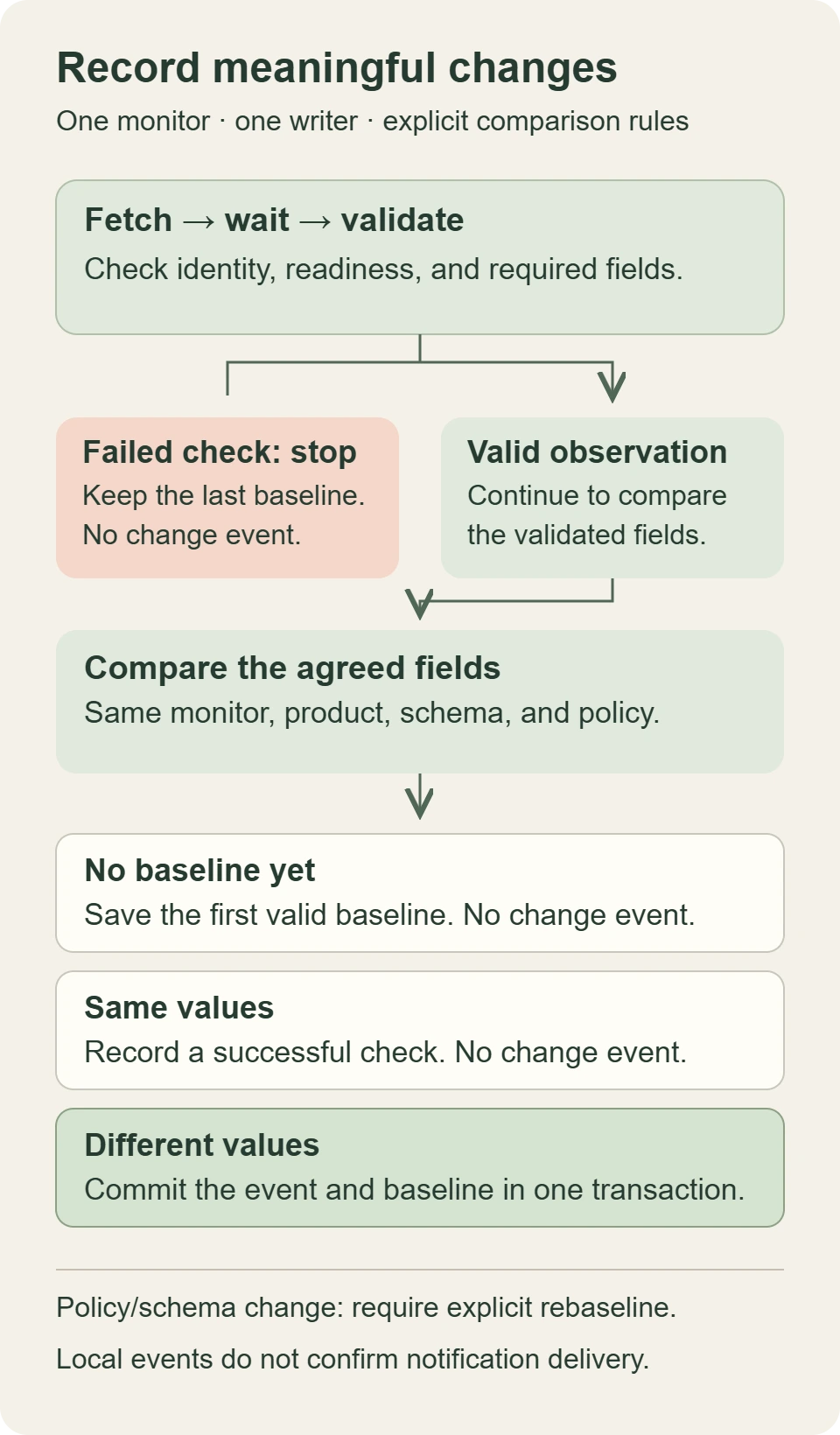
View the full-size state-flow diagram.
Build an owned page with delayed content
The fixture serves six versions of one synthetic product from 127.0.0.1 on port 8765. A short JavaScript delay inserts the product and then sets a readiness attribute. Playwright waits for that specific signal before reading the fields. Loading the document alone does not establish that the product is ready.
Each field must match exactly once. This follows Playwright’s locator guidance: identify the intended element instead of selecting the first match to hide ambiguity. The readiness marker is part of this owned page’s contract. On a real permitted source, you would need a readiness condition that its behavior actually supports.
Download the tested Python example and evidence package. It includes the source, tests, pinned dependencies, setup commands, raw results, and an example database/export. Follow the README in a fresh directory and keep local port 8765 free. Run one demo or test process at a time. The script requires Python 3.12 or later; the exact tested versions are listed above.
The Python implementation
import json
import re
import sqlite3
import threading
import uuid
from datetime import datetime, timezone
from http.server import BaseHTTPRequestHandler, HTTPServer
from playwright.sync_api import sync_playwright

ORIGIN = "http://127.0.0.1:8765"
MONITOR = "owned-catalog:P-001"
POLICY = "product-v1"
SCHEMA = 1
ALLOWED = {f"{ORIGIN}/step/{n}" for n in range(1, 7)}


def packed(value):
    return json.dumps(value, sort_keys=True, separators=(",", ":"))


class Fixture(BaseHTTPRequestHandler):
    def do_GET(self):
        if self.path not in {f"/step/{n}" for n in range(1, 7)}:
            self.send_error(404)
            return
        step = int(self.path.rsplit("/", 1)[1])
        price = "9.90" if step < 3 else "10.90"
        price_html = "" if step == 6 else (
            f'<span data-field="price">{price}</span>')
        stock = "in_stock" if step < 5 else "out_of_stock"
        product = (
            '<article data-product-id="P-001">' + price_html +
            '<span data-field="currency">USD</span>' +
            f'<span data-field="availability">{stock}</span></article>')
        html = (
            '<!doctype html><meta charset="utf-8"><title>Owned fixture</title>'
            '<div id="banner">Demo catalog</div><div id="product"></div>'
            '<div id="timestamp"></div><script>setTimeout(() => {'
            'document.querySelector("#product").innerHTML = ' +
            json.dumps(product) + ';'
            'document.querySelector("#timestamp").textContent = Date.now();'
            'document.body.dataset.ready = "yes";}, 150);</script>')
        body = html.encode("utf-8")
        self.send_response(200)
        self.send_header("Content-Type", "text/html; charset=utf-8")
        self.send_header("Content-Length", str(len(body)))
        self.end_headers()
        self.wfile.write(body)

    def log_message(self, *_):
        pass


def observe(page, step, observation_id):
    url = f"{ORIGIN}/step/{step}"
    if url not in ALLOWED:
        raise ValueError("destination not allowed")
    response = page.goto(url, wait_until="domcontentloaded", timeout=5000)
    if response is None or response.status != 200 or page.url != url:
        raise ValueError("unexpected response or destination")
    page.locator('body[data-ready="yes"]').wait_for(timeout=2000)
    root = page.locator('[data-product-id="P-001"]')
    if root.count() != 1:
        raise ValueError("missing or duplicate product")

    def field(name):
        node = root.locator(f'[data-field="{name}"]')
        if node.count() != 1:
            raise ValueError(f"missing or duplicate {name}")
        return " ".join(node.inner_text(timeout=1000).split())

    raw_price = field("price")
    if not re.fullmatch(r"[0-9]+(?:[.][0-9]{1,2})?", raw_price):
        raise ValueError("invalid USD price")
    whole, _, fraction = raw_price.partition(".")
    price_minor = int(whole) * 100 + int((fraction + "00")[:2])
    currency, availability = field("currency"), field("availability")
    if currency != "USD" or availability not in {"in_stock", "out_of_stock"}:
        raise ValueError("invalid currency or availability")
    return {
        "id": observation_id, "monitor": MONITOR,
        "source": "owned-catalog", "product_id": "P-001",
        "policy": POLICY, "schema": SCHEMA, "url": url,
        "observed_at": datetime.now(timezone.utc).isoformat(),
        "fields": {"price_minor": price_minor, "currency": currency,
                   "availability": availability}}


def open_db(path):
    # Python 3.12+: explicitly choose transaction control.
    db = sqlite3.connect(path, autocommit=True, timeout=2)
    db.executescript("""
        CREATE TABLE IF NOT EXISTS baseline (
            monitor TEXT PRIMARY KEY, revision INTEGER NOT NULL,
            payload TEXT NOT NULL);
        CREATE TABLE IF NOT EXISTS observation (
            id TEXT PRIMARY KEY, payload TEXT NOT NULL,
            result TEXT NOT NULL);
        CREATE TABLE IF NOT EXISTS event (
            id TEXT PRIMARY KEY, monitor TEXT NOT NULL,
            revision INTEGER NOT NULL, before_json TEXT NOT NULL,
            after_json TEXT NOT NULL, UNIQUE(monitor, revision));
    """)
    return db


def revision(db):
    row = db.execute("SELECT revision FROM baseline WHERE monitor=?",
                     (MONITOR,)).fetchone()
    return 0 if row is None else row[0]


def apply(db, obs, expected_revision, *, rebaseline=False):
    # Caller supplies an already validated observation from observe().
    payload = packed(obs)
    db.execute("BEGIN IMMEDIATE")
    try:
        seen = db.execute("SELECT payload, result FROM observation WHERE id=?",
                          (obs["id"],)).fetchone()
        if seen:
            if seen[0] != payload:
                raise ValueError("observation ID reused with different payload")
            db.execute("COMMIT")
            return {**json.loads(seen[1]), "replayed": True}
        row = db.execute("SELECT revision, payload FROM baseline WHERE monitor=?",
                         (MONITOR,)).fetchone()
        current = 0 if row is None else row[0]
        if current != expected_revision:
            raise ValueError("stale baseline revision")
        before = None if row is None else json.loads(row[1])
        if before and any(before[k] != obs[k] for k in
                          ("monitor", "source", "product_id")):
            raise ValueError("identity changed; use a separate monitor")
        policy_changed = before is not None and any(
            before[k] != obs[k] for k in ("policy", "schema"))
        if policy_changed and not rebaseline:
            raise ValueError("policy changed; explicit rebaseline required")
        if rebaseline and not policy_changed:
            raise ValueError("rebaseline requires a policy or schema change")
        changed = before is not None and before["fields"] != obs["fields"]
        status = ("baseline" if before is None else "rebaseline"
                  if policy_changed else "changed" if changed else "unchanged")
        new_revision = current + (status != "unchanged")
        event_id = None
        if status == "changed":
            event_id = f"{MONITOR}:{new_revision}"
            db.execute("INSERT INTO event VALUES (?, ?, ?, ?, ?)",
                       (event_id, MONITOR, new_revision, row[1], payload))
        db.execute("INSERT INTO baseline VALUES (?, ?, ?) "
                   "ON CONFLICT(monitor) DO UPDATE SET "
                   "revision=excluded.revision, payload=excluded.payload",
                   (MONITOR, new_revision, payload))
        result = {"status": status, "observation_id": obs["id"],
                  "revision": new_revision, "event_id": event_id}
        db.execute("INSERT INTO observation VALUES (?, ?, ?)",
                   (obs["id"], payload, packed(result)))
        db.execute("COMMIT")
        return result
    except Exception:
        if db.in_transaction:
            db.execute("ROLLBACK")
        raise


def main():
    server = HTTPServer(("127.0.0.1", 8765), Fixture)
    thread = threading.Thread(target=server.serve_forever, daemon=True)
    thread.start()
    db = None
    try:
        db = open_db("change-demo.sqlite3")
        run_id = uuid.uuid4().hex
        with sync_playwright() as p:
            browser = p.chromium.launch()
            try:
                context = browser.new_context(service_workers="block")
                try:
                    context.route("**/*", lambda route: route.continue_()
                                  if route.request.url in ALLOWED
                                  else route.abort())
                    page = context.new_page()
                    for step in range(1, 7):
                        observation_id = f"{run_id}:{step}"
                        try:
                            expected = revision(db)
                            obs = observe(page, step, observation_id)
                            result = apply(db, obs, expected)
                        except Exception as exc:
                            result = {"status": "error", "observation_id":
                                      observation_id, "error": str(exc)}
                        print(packed(result))
                finally:
                    context.close()
            finally:
                browser.close()
        # Read-only export; it can print the same rows on a later run.
        for row in db.execute("SELECT id, before_json, after_json FROM event "
                              "ORDER BY revision"):
            print(packed({"event_id": row[0], "before": json.loads(row[1]),
                          "after": json.loads(row[2])}))
    finally:
        if db is not None:
            db.close()
        server.shutdown()
        server.server_close()
        thread.join(timeout=2)


if __name__ == "__main__":
    main()
The script uses one browser context and one page, attempts at most six observations, and places cleanup in finally blocks. Tests exercised cleanup through the main function on both the normal six-step run and injected extraction failures. Navigation has a 5-second timeout, readiness has 2 seconds, and field reads have 1 second. These are individual operation bounds, not a measured end-to-end deadline. Browser startup, shutdown, and operating-system scheduling can add time.
The browser context blocks service workers, and request routing permits only the six owned fixture URLs. It keeps this demonstration focused on its fixture; it is not a claim of network isolation or a safe general-purpose URL-fetching service. Do not replace the local URLs with arbitrary public targets without redesigning access, rate limits, and destination controls.
Inspect observations and change events separately
On an empty database, the observed six-step sequence was baseline, timestamp noise, a price change, unchanged price, an availability change, and a missing-price error. It produced two events. The failed sixth check left the fifth observation as the last valid baseline.
Observed sequence on a fresh database (condensed from raw JSON):
1  baseline   revision=1  event_id=null
2  unchanged  revision=1  event_id=null
3  changed    revision=2  event_id=owned-catalog:P-001:2
4  unchanged  revision=2  event_id=null
5  changed    revision=3  event_id=owned-catalog:P-001:3
6  error      missing or duplicate price

Observed final baseline: 1090 USD minor units, out_of_stock
Observed recorded events: 2
The JSON output also includes observation IDs. Each stored observation includes its source URL, capture time, product identity, schema version, comparison policy, and validated fields. An event retains both the prior and current observation. The capture time records when the script observed the page; it does not prove that the source data was current.
The example keeps change-demo.sqlite3 between runs. Running the six steps again creates new observations and starts by comparing the first fixture state with the saved final state. It is not the same as a fresh-database demonstration. Use a separate test directory for an empty-database run; do not discard a real monitor’s baseline to make its output match a sample.
Commit the event and baseline together
An event and its new baseline belong in the same transaction. If one write succeeds and the other does not, a later run can lose a transition or record it twice. The implementation explicitly opens a SQLite transaction and includes rollback handling for write failures. The test injected a failure between the event and baseline writes: both changes rolled back, and retry committed one complete transition. Python’s sqlite3 transaction documentation explains the available control modes; this implementation explicitly selects autocommit=True and uses SQL BEGIN, COMMIT, and ROLLBACK instead of relying on the default.
Observation replay and new collection are different operations. Passing the same saved observation ID and exact payload to apply again returns its prior result without adding a transition. Reusing that ID with different content raises an error. Fetching the page again produces a new timestamp and observation ID, so it is a new observation even when the business fields are unchanged.
Events use monitor identity plus a monotonically increasing revision. They do not use a permanent unique key made only from the old and new values. If the price moves A → B → A → B, all three transitions matter. A forever-unique A-to-B hash would incorrectly discard the last one.
The expected revision is read before collection and checked inside the write transaction. The stale-revision test rejected the attempted write without changing stored state. This remains a single-writer example, not a multi-worker coordination design. The apply function accepts observations validated by observe; it is not an API for accepting untrusted dictionaries. A changed policy or schema needs an explicit rebaseline call with rebaseline=True after review. There is no automated migration or rebaseline command in this demo.
Keep failed checks out of business events
A missing price does not mean zero. A missing product selector does not prove that the product was deleted. A navigation failure does not establish that availability changed. Preserve the last valid state and record the failed attempt separately so a consumer can distinguish “unchanged” from “we could not check.”
This example prints check failures to the command line. It does not persist a complete failure log or implement retries, a scheduler, or notification delivery. Before operating a monitor, define how failed attempts are retained and when repeated failures need attention. Our web scraping infrastructure guide covers the surrounding queues, retry boundaries, and retention decisions.
What the tests established
The package records 16 passing test methods covering 15 acceptance groups. State tests covered first baseline, unchanged observations, price and availability changes, recurring A → B → A → B transitions, replay and payload conflicts, rollback/retry, subprocess restart, stale revisions, explicit policy rebaseline, and repeated event export.
Browser tests used real local HTTP and delayed JavaScript, plus intercepted owned fixture responses for malformed fields, HTTP errors, and aborted navigation. They checked ignored banner/formatting noise, missing and duplicate selectors, wrong identity, invalid price/currency/availability, a missing readiness marker, disallowed destinations, the six-observation cap, and cleanup. Failed checks preserved the baseline and event count.
The fresh demo matched the planned result: two stored events and a final valid baseline of 1090 USD minor units, out_of_stock, after the missing-price error. The download includes an expected-versus-observed table, raw output, and database evidence. An initial overlapping test invocation had local connection failures; after stopping the stalled invocation, connection checks and the suite passed without changing the example source. Keep this fixture single-process on its fixed port.
These tests do not establish power-loss recovery, multi-worker coordination, public-website compatibility, notification delivery, or continuous operation. Linux, macOS, containers, scheduling, multiple hosts, and Hivenet deployment were not tested. A process restart is not a host-loss test.
Account for what polling and exports cannot tell you
Polling samples a page. If a value changes and changes back between observations, the script can miss both transitions. Choose a polling interval from the source’s permitted access pattern and the consequence of a missed change. A shorter interval increases requests and operating cost; it cannot guarantee that every intermediate state is captured.
The final database query is a read-only event export. Repeating it can print the same events again. Stable event IDs let a downstream consumer recognize a repeated row, but they do not prove exactly-once email, webhook, or other delivery. Delivery would need its own acknowledgments, retry policy, and failure evidence.
Before adding parallel pages, measure Playwright memory usage on the workload and host you intend to use. To estimate ongoing spend, adapt the web scraping cost model around valid observations. A successful unchanged check still costs resources and is still useful; dividing total cost only by change events answers a different question and can be undefined when nothing changes.
Start with a small permitted source, explicit fields, and an inspectable baseline. Expand the monitor only after the validation, failure, and storage behavior has been demonstrated for that setup.
Your next workload belongs on Hivenet.
Pick one AI, compute, or storage workload and see the difference for yourself. Spin it up in minutes, or let our team map your fastest path to production.

