Sign in to Hivenet
Access your files and manage your storage account.
Store
Access your files and manage your storage account.
Compute
Launch instances and manage your compute resources.
Store and Compute still use separate accounts today. We’re working on a unified sign-in.
Just need to send a file?
Use Send directlyNew to Hivenet? Get Started
Get started with Hivenet
Choose what you want to use first.
Store
Back up photos and files across your devices.
Compute
Launch self-serve GPU compute for demanding work.
Store and Compute still use separate accounts today. We’re working on a unified account experience.
Need Hivenet for business?
Talk to salesNeed to send a file?
Open SendAlready have an account? Sign in

Extract PDF tables with Python: validate rows before CSV export
To extract tables from a PDF with Python, use a table-aware parser such as pdfplumber, inspect the detected cells, and validate the records before exporting CSV. Finding a rectangle of text is only the first step. You still need to check the headers, missing values, duplicate records, and page coverage.
This example processes an owned, digitally generated order report with ruled tables. It checks six records across two pages and writes a three-column CSV only when the whole report passes. It keeps the original cell text and page references in companion JSON files so you can trace each exported record back to the PDF.
The tested scope is deliberately narrow: Python 3.12.14 and pdfplumber 0.11.9 on Windows, using the supplied fixtures. It does not reconstruct scanned tables, support arbitrary report layouts, or establish extraction accuracy on your documents.
Choose the PDF result you need
A PDF describes a page, so text that looks like a table does not necessarily arrive as rows and columns. Splitting extracted lines on spaces can move a wrapped description into a new record or separate an amount from its order.
If you need searchable prose, start with extracting PDF text with Python. If the document is image-only, assess a separate OCRmyPDF workflow. A searchable text layer does not prove that a table can be reconstructed correctly.
For this report, the desired result is an import file with exactly these columns:
order_id,order_date,amount_usd
ORD-001,2026-11-01,19.95
ORD-002,2026-11-02,80.00
ORD-003,2026-11-03,0.05
ORD-004,2026-11-04,12.50
ORD-005,2026-11-05,7.50
ORD-006,2026-11-06,30.00
The source also contains a Description column. We preserve that text in records.json instead of putting free text into the CSV. The six amounts total 150.00 USD. That total and the full expected records come from a separate reference fixture, not from treating the extractor's output as its own answer key.
Define the table contract before extraction
The sample expects two pages, one detected ruled table per page, and six data rows in total. Each table must start with the exact headers Order ID, Order date, Description, and Amount USD, in that order. The repeated header on the second page is recorded separately from the data.
Data cells have explicit rules:
- Order IDs use ORD- followed by three ASCII digits and must be unique across the whole report.
- Dates must be real calendar dates in YYYY-MM-DD form.
- Amounts must be nonnegative, have exactly two decimal places, and be no greater than 99,999,999.99. Currency symbols, grouping separators, signs, and extra decimal places are rejected.
- Descriptions must be present. Whitespace is collapsed, including a line break inside a wrapped description, while the raw cell text stays in the audit.
These are this import's rules, not universal rules for PDF tables. A report with a different ID format, currency, or column order needs a revised contract and new test cases. Do not make it pass by filling missing cells, guessing a currency, rounding malformed amounts, or dropping records.
Run the checked pdfplumber example
Download the PDF table extraction sample. It includes the extractor, pinned dependencies, fixture generator, owned PDFs, expected records, tests, observed output, and visual checks. Use a Python environment you control, then run these commands from the extracted sample directory:
python -m pip install -r requirements.txt
python extract_tables.py fixtures/orders.pdf output
python -m unittest -v test_extract_tables
The output directory must not already exist. For another run, choose a fresh directory, such as output-review. The recorded test run used installed dependencies; a clean dependency installation on another machine has not been verified.
The successful extraction command returned:
{"status": "exported", "candidate_rows": 6, "valid_rows": 6, "rejects": 0}
Exit code 0 means the CSV was exported. Exit code 2 means processing completed but validation rejected the report. Exit code 1 means a setup, parsing, or output error. A rejected run has no final orders.csv. Consumers should require both that file and an audit status of exported; a partial file or a sidecar alone is not a success signal.
Find every table and retain its source location
pdfplumber's documentation describes find_tables() as returning a list of table objects, with cells, rows, columns, bounding boxes, and extraction methods. That makes it useful when you need to account for every candidate rather than select only the largest table.
The sample uses line-based detection because the owned report has visible cell borders. Its settings are explicit and stored in the audit:
SETTINGS = dict(
vertical_strategy="lines",
horizontal_strategy="lines",
snap_tolerance=3,
join_tolerance=3,
intersection_tolerance=3,
)

tables = page.find_tables(table_settings=SETTINGS)
candidates = [
(table_number, table.extract(), list(table.bbox))
for table_number, table in enumerate(tables, 1)
]
This is a detection excerpt; the downloadable script supplies the validation and error handling. Every candidate record retains its one-based page, table, and row number, plus the table bounding box. Extra tables cause rejection even if one of them looks correct. Missing tables also cause rejection.
A no_tables_found result is a reason to inspect the page. It is not a diagnosis that the PDF is scanned. A borderless digital table, a blank page, and an image-only page all produced that outcome in the supplied fixtures. This sample does not fall back to a different extraction strategy.
Normalize whitespace, then reject invalid rows
The wrapped description on page two becomes “Café supplies with a deliberately wrapped description.” Its line break is replaced by a space, while the accent and words remain intact. Both the raw and normalized forms are available for review.
That limited normalization is different from repairing missing data. A merged cell that removes a required value fails validation. So does a changed currency header, an impossible date, or a duplicate order ID on a later page. Identical duplicate records still fail: the extractor does not decide which occurrence to keep.
Amounts are first checked as strings with an exact decimal format. Decimal is then used for numeric checks and the independent total assertion. This avoids converting money to a binary floating-point value and hoping formatting restores the intended amount.
from decimal import Decimal
import re

amount = "19.95"
valid_format = re.fullmatch(
r"(?:0|[1-9][0-9]{0,7})\.[0-9]{2}", amount
)
if not valid_format: raise ValueError("invalid_amount")
within_range = Decimal(amount) <= Decimal("99999999.99")
if not within_range: raise ValueError("amount_out_of_range")
The complete script checks every candidate row before deciding whether to export. A single bad row withholds the whole CSV. Its audit still records the candidates and rejection reasons, so an operator can inspect the source instead of mistaking a shortened file for a complete report.
Inspect the PDF, detected cells, and exported records
A successful parser call does not replace visual review. Compare each source page with the detected-table overlay, then check the first and last records, repeated headers, wrapped cells, and page-to-record mapping.
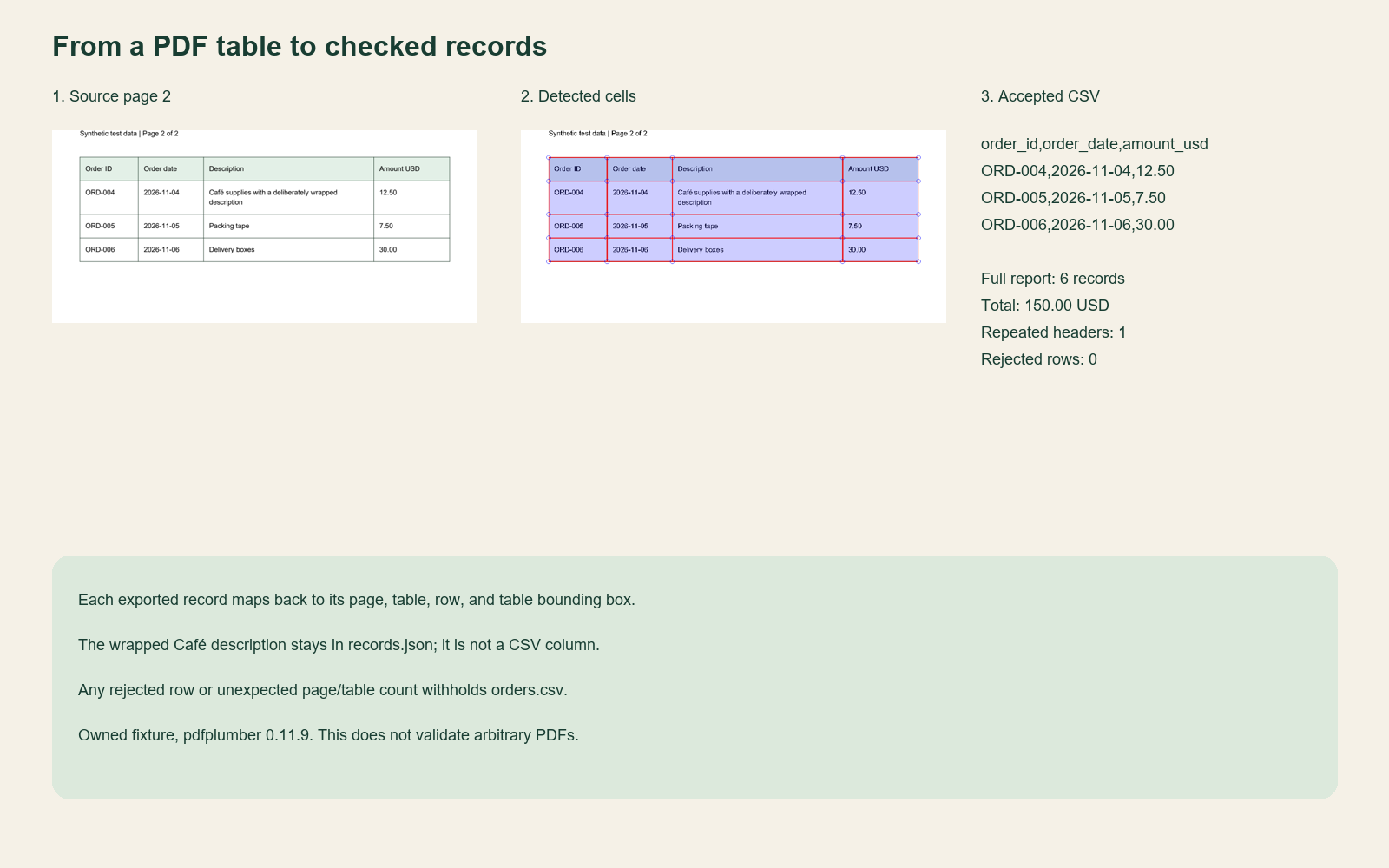
Open the full-size PDF table comparison.
The sample writes an overlay for every processed page using pdfplumber's table-debugging view. It also records the source SHA-256, package versions, table settings, headers, raw cells, canonical values, and rejection reasons in audit.json. The records.json companion maps CSV record numbers back to their source locations and retains descriptions.
Keep these files with the input PDF. A source hash helps identify which byte snapshot was processed, but it does not establish that the document is correct or trustworthy.
What the local tests established
On November 18, 2026, all 28 unittest methods passed on Windows with Python 3.12.14 and pdfplumber 0.11.9. The clean two-page fixture produced six exact reference records, covered both pages, retained the wrapped Unicode description, and totaled 150.00 USD.
Real PDF cases also exercised changed or missing headers, extra tables and columns, merged or missing cells, duplicate orders across pages, borderless tables, header-only tables, blank pages, image-only pages, encryption, and malformed input. The malformed file produced a processing error; the encrypted fixture was rejected without password handling.
The suite reopened the CSV to check its exact headers and values, verified the provenance mapping, tested existing-directory refusal and a fresh rerun, and injected failures during sidecar writing and final CSV rename. A failed rename left only a clearly named partial file, not an accepted CSV. This does not establish recovery from a machine crash or power loss.
All 24 readable fixture pages were rendered and reviewed. The malformed fixture was intentionally unrenderable. The encrypted fixture was opened with its known test password for visual inspection only; that is separate from the extractor, which rejects it.
What the limits do not establish
The script limits encoded input to 5 MiB, pages to 10, candidate data rows to 1,000, and raw cell text to 2,000 characters. The byte and page boundaries were tested at their actual limits. Row and cell boundary logic was checked with smaller injected limits against the real parsed fixture, not with a 1,000-row production workload.
Page, row, and cell checks happen after parsing or table extraction. They are not hard CPU or memory controls. The example is for a stable, trusted local PDF; it is not an upload endpoint or an isolation boundary for hostile files.
Linux, macOS, containers, cloud execution, concurrent workers, scheduling, performance, costs, and accuracy across document collections were not tested. Use the fixtures to understand the behavior, then add representative documents and independent expected results before adapting the process.
Hand validated CSV to the next stage
The exported columns match the input contract in the Python ETL pipeline example. That is a useful boundary: PDF extraction accounts for source cells and rejected rows; the importer validates its own input before any database operation.
The separate ETL validator was not executed in this test run, and no PostgreSQL load was attempted. Matching column names does not prove an integration works. Run the importer's validation-only command on the exported file in your own environment, inspect its report, and treat database loading as a separate step.
Choose where the repeatable job should run
A local script is enough to inspect occasional reports. If the input becomes a recurring workload with known layouts, a CPU VM can provide a controlled place for the job, dependencies, and output files. Start with when to choose a CPU virtual machine when assessing that deployment.
The VM does not solve table ambiguity. You still need representative tests, a review path for rejected documents, resource controls suited to your inputs, and a policy for retaining source files and audit records. If layouts vary too widely for a maintained parser, evaluate document-processing services against the same checked records and review requirements.
For this sample, the useful stopping point is concrete: six verified records, a complete source mapping, and an export that is withheld when the report breaks its contract. Establish that behavior before connecting extraction to a scheduled import.
Your next workload belongs on Hivenet.
Pick one AI, compute, or storage workload and see the difference for yourself. Spin it up in minutes, or let our team map your fastest path to production.